activities
How can I filter the diary entries for activities with common attributes?
14/02/13 10:49 Filed in: Diary
Problem: The diary windows left pane has preconfigured filter modes for date, equipment and workout types. But you would like to see all entries of an arbitrary common property, month or year.
Solution: in the diary window search field, you can for entries that match common attributes. The following examples may give you a picture of what that is capable of.
Examples:
- Search for fragments in the comment field. For example 'evening run' would find all entries that contain this text fragment in their comment field.
- This enables you to use tagging. For example you could make yourself up a tag like 'x-withDog' 'x-fromWorkToHome', enter these tags into any activities comment and then search for those.
- You can also search for parts of the date. Enter '2011-' to find all entries of that year or '2011-03' to find all entries of that month. or -'03-' to find all entries of in March of every year. (for your interest, the full date format is yyy-mm-dd)
Solution: in the diary window search field, you can for entries that match common attributes. The following examples may give you a picture of what that is capable of.
Examples:
- Search for fragments in the comment field. For example 'evening run' would find all entries that contain this text fragment in their comment field.
- This enables you to use tagging. For example you could make yourself up a tag like 'x-withDog' 'x-fromWorkToHome', enter these tags into any activities comment and then search for those.
- You can also search for parts of the date. Enter '2011-' to find all entries of that year or '2011-03' to find all entries of that month. or -'03-' to find all entries of in March of every year. (for your interest, the full date format is yyy-mm-dd)
How can I compare multiple workouts
29/07/11 17:21 Filed in: Help
Problem: You have several similar workouts and would like to compare these to each other.
Solution: open the diary window and drill down to similar workouts by either using the similar distance filter on the left or by flagging selected workouts and the filtering for these.
Now select multiple entries in the table and compare the charts in the Workouts view. The newest of the workouts is being drawn in the most saturated color.
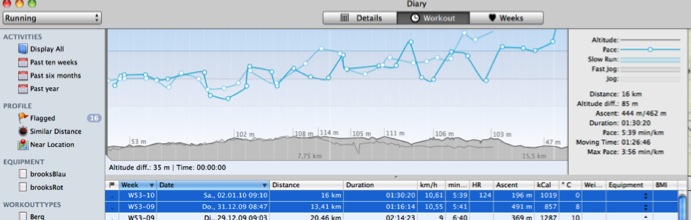
Solution: open the diary window and drill down to similar workouts by either using the similar distance filter on the left or by flagging selected workouts and the filtering for these.
Now select multiple entries in the table and compare the charts in the Workouts view. The newest of the workouts is being drawn in the most saturated color.
How can I reset hidden activities from the import
29/07/11 15:29 Filed in: Help

Solution: In
TrailRunner Preferences > Advanced > Import : click on the Reset button.Modify workout courses
04/01/13 22:43 Filed in: Import
Problem: You forgot to turn off your GPS device or the signal was very weak at the beginning of your workout. You would like to trim your recorded workout data at the beginning and/or end.
Background: You can only modify workout courses for activities while you are about to import them. Once they are within the diary, it's not possible anymore to alter them.
Solution: Use the track-point inspector panel to modify the activities track before you import the activity.
There are two techniques you can now use to correct the data to be imported before you actually import them. In both cases, first open the track-point inspector panel in the bottom toolbar:
1) Select the range you want to remove. In the track-point inspector panel select the 'trim selection' command. This will remove all data points from the selection up to the nearest edge.
2) Select one data point, e.g. the first datapoint of the presumable next workout. In the track-point inspector panel, select the 'split at selection' command. This will remove the selected data point and create two new entries for either side of the selection.
Reference: Please also see Tutorial > Import Activities
Background: You can only modify workout courses for activities while you are about to import them. Once they are within the diary, it's not possible anymore to alter them.
Solution: Use the track-point inspector panel to modify the activities track before you import the activity.
There are two techniques you can now use to correct the data to be imported before you actually import them. In both cases, first open the track-point inspector panel in the bottom toolbar:
1) Select the range you want to remove. In the track-point inspector panel select the 'trim selection' command. This will remove all data points from the selection up to the nearest edge.
2) Select one data point, e.g. the first datapoint of the presumable next workout. In the track-point inspector panel, select the 'split at selection' command. This will remove the selected data point and create two new entries for either side of the selection.
Reference: Please also see Tutorial > Import Activities
Append workouts into one
04/07/10 13:25 Filed in: Import
Problem: You made several activity recordings and want to append each single activity to one concatenated representation.
Background: You can only append activities to each other while you are about to import them. Once they are within the diary, it's not possible anymore to alter them.
Solution: In the import pane, place a checkmark on each entry you want to concatenate. In the lower toolbar, use the Append toolbar button to replace both by a concatenated representation. Each activity will be represented as a lap within the resulting placeholder activity.
Background: You can only append activities to each other while you are about to import them. Once they are within the diary, it's not possible anymore to alter them.
Solution: In the import pane, place a checkmark on each entry you want to concatenate. In the lower toolbar, use the Append toolbar button to replace both by a concatenated representation. Each activity will be represented as a lap within the resulting placeholder activity.
Missing Activities
14/02/13 10:49 Filed in: Conceptual
Problem: In the main window, the activities list does not display entries that previously have been there. But I can find these in the diary.
Solution: Below the activities list there is a Filter Button. Please check if you have set a filter that hides the entries you where looking for.
Solution: Below the activities list there is a Filter Button. Please check if you have set a filter that hides the entries you where looking for.
Missing Activities
14/02/13 10:49 Filed in: Conceptual
Problem: In the main window, the activities list does not display entries that previously have been there. But I can find these in the diary.
Solution: Below the activities list there is a Filter Button. Please check if you have set a filter that hides the entries you where looking for.
Solution: Below the activities list there is a Filter Button. Please check if you have set a filter that hides the entries you where looking for.
Make Route from Activity takes veeeery long
22/04/12 10:51 Filed in: Import
Problem: You have selected an activity and click on the make route button. TrailRunner becomes unresponsive and calculates for a very long time until the process is finished or seemingly never finishes.
Background: If you have already collected a network of track and merge new elements into it, the calculation of what is already there and what is similar and can be consolidated can be very time intensive.
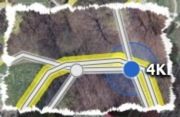 Suggestion: Please read the quick-guide tutorial and understand what way-point perimeters mean. If you can set up your network of tracks to contain landmarks with good perimeters, the operation above will be much faster.
Workaround: The only alternative is to merge the track by hand (yellow sign) and then later recreate a route based on the spitted and joined tracks. This will also give you the opportunity to initially set up your way-point perimeters.
> QuickGuide Tutorlal
Background: If you have already collected a network of track and merge new elements into it, the calculation of what is already there and what is similar and can be consolidated can be very time intensive.
Workaround: The only alternative is to merge the track by hand (yellow sign) and then later recreate a route based on the spitted and joined tracks. This will also give you the opportunity to initially set up your way-point perimeters.
> QuickGuide Tutorlal
Importing GPX files as Activities, Routes and Tracks.
05/01/13 14:37 Filed in: Import
Problem: When you import a GPX file, the following intentions may be on your mind:
a) The GPX file you import is actually a recorded workout of your own (possibly containing heart-rate data), so it's an activity.
b) The file contains a route created by someone else and you want to add it to your own list of routes.
c) You are interested in the tracks and way-points contained in the file and you want to merge them into your network of tracks -- to be used in future routes you create.
Solution: when you import a GPX file, TrailRunner asks you if the file is to be imported as an activity or a route. Chose either option.
When you want to import the waypoints only, go to the Document Toolbar > Locations and import the file there.
Tip: For a better conceptual understanding of TrailRunner and the difference between tracks, routes and activities, take a look at the TrailRunner QuickGuide Tutorial
a) The GPX file you import is actually a recorded workout of your own (possibly containing heart-rate data), so it's an activity.
b) The file contains a route created by someone else and you want to add it to your own list of routes.
c) You are interested in the tracks and way-points contained in the file and you want to merge them into your network of tracks -- to be used in future routes you create.
Solution: when you import a GPX file, TrailRunner asks you if the file is to be imported as an activity or a route. Chose either option.
When you want to import the waypoints only, go to the Document Toolbar > Locations and import the file there.
Tip: For a better conceptual understanding of TrailRunner and the difference between tracks, routes and activities, take a look at the TrailRunner QuickGuide Tutorial
Can I merge GPS data with workout data?
10/02/10 21:12 Filed in: Import
Problem: Is there an easy way to merge GPS data and HR data into TrailRunner?
Solution: When your heart-rate data contains distance information, the you can do the following:
- First import the track from your GPS device, iphone or file and make a route of it so that it appears in the routes list.
- Remove the activity as otherwise you cannot add a new activity for the same date. - Then import your workout from your ForeRunner 50 or HRM file and select the route in the import panel.
TrailRunner will now merge the Heat-rate data and the GPS Data based on the distance information.
Note: For not GPS enabled workout devices you require a food-pod while your where running as TrailRunner requires distance information for the matching.
Solution: When your heart-rate data contains distance information, the you can do the following:
- First import the track from your GPS device, iphone or file and make a route of it so that it appears in the routes list.
- Remove the activity as otherwise you cannot add a new activity for the same date. - Then import your workout from your ForeRunner 50 or HRM file and select the route in the import panel.
TrailRunner will now merge the Heat-rate data and the GPS Data based on the distance information.
Note: For not GPS enabled workout devices you require a food-pod while your where running as TrailRunner requires distance information for the matching.
What's the difference between activities, workouts, routes, tracks and way-points?
22/12/10 09:37 Filed in: Conceptual
Problem: You have used other applications that import tracks and these never use vocabulary like activity, route or workout. Why is TrailRunner not using the same terms? And by the way, what is the difference between a track, an activity, a route and a workout?
Background: TrailRunner is more or less two applications in one: on the one hand a route planning application managing a personal network of tracks and on the other hand a journal for your sport activities. For your better understanding, please take a look at the TrailRunner QuickGuide. The differences should be obvious after you have read it. If not, please be so kind to let me know what you do not understand so I can improve either the QuickGuide or even TrailRunner.
> QuickGuide Tutorial
Background: TrailRunner is more or less two applications in one: on the one hand a route planning application managing a personal network of tracks and on the other hand a journal for your sport activities. For your better understanding, please take a look at the TrailRunner QuickGuide. The differences should be obvious after you have read it. If not, please be so kind to let me know what you do not understand so I can improve either the QuickGuide or even TrailRunner.
> QuickGuide Tutorial