Conceptual
Difference between ascent, descent and elevation
18/08/14 13:15
Problem: In the altitude histogram, TrailRunner displays three values derived from altitude values. These are named elevation, ascent and descent. What's the different between these?
Description: Elevation is the absolute difference between the highest summit and the lowest valley. It may also be named altitude difference or altitude range.
Ascent is being displayed as ascent/descent value which is the gain in only positive / negative altitude differences.
Example: With an altitude series of 10, 13, 15, 13, 11, 16
the elevation is 10..16 = 6
the ascent is 10..15 + 11..16 = 10
and the descent is 15..11 = 4
Tip: As most GPS receivers tend to be very inaccurate with the recoding of altitude data, the ascent and decent values can become unnaturally high as only small gains can sum up to huge values. In TrailRunner > Preferences > Advanced you can set a high pass filter for the ascent/descent calculation. See Filter altitude noise.
Additional note: It may even happen that you record a round-trip and the ascent and descent values differ. This comes from the simple fact that altitude recordings made by a GPS are extremely inaccurate. To calculate the altitude, the GPS requires good reception of at least three satellites. If reception differs during two visits of a location, the derived ascent and descent values will also differ.
Description: Elevation is the absolute difference between the highest summit and the lowest valley. It may also be named altitude difference or altitude range.
Ascent is being displayed as ascent/descent value which is the gain in only positive / negative altitude differences.
Example: With an altitude series of 10, 13, 15, 13, 11, 16
the elevation is 10..16 = 6
the ascent is 10..15 + 11..16 = 10
and the descent is 15..11 = 4
Tip: As most GPS receivers tend to be very inaccurate with the recoding of altitude data, the ascent and decent values can become unnaturally high as only small gains can sum up to huge values. In TrailRunner > Preferences > Advanced you can set a high pass filter for the ascent/descent calculation. See Filter altitude noise.
Additional note: It may even happen that you record a round-trip and the ascent and descent values differ. This comes from the simple fact that altitude recordings made by a GPS are extremely inaccurate. To calculate the altitude, the GPS requires good reception of at least three satellites. If reception differs during two visits of a location, the derived ascent and descent values will also differ.
How can I switch between different OSM Renders
21/06/13 12:00
Problem: When background maps in TrailRunner are set to openStreetMap, the displayed maps are outdated or use a renderer I do not prefer.
Solution: TrailRunner supports the following OSM Render Styles: Classic OpenStreetMap, OpenCycleMap and CloudMade Fine line. To switch between these, Goto to Bottom Toolbar > Background Map > Display Settings. In the left pane select any of the available OSM tile servers.
Tip: As tiles are heavily cached in TrailRunner, you may want to right click the map and reload background maps whenever you see outdated tiles being displayed from the cache. To reload all osm map tiles, delete the following folder: < yourhome >/Library/Caches/TrailRunner/MapViewTiles/openstreetmap.org
Solution: TrailRunner supports the following OSM Render Styles: Classic OpenStreetMap, OpenCycleMap and CloudMade Fine line. To switch between these, Goto to Bottom Toolbar > Background Map > Display Settings. In the left pane select any of the available OSM tile servers.
Tip: As tiles are heavily cached in TrailRunner, you may want to right click the map and reload background maps whenever you see outdated tiles being displayed from the cache. To reload all osm map tiles, delete the following folder: < yourhome >/Library/Caches/TrailRunner/MapViewTiles/openstreetmap.org
Missing Activities
14/02/13 10:49
Problem: In the main window, the activities list does not display entries that previously have been there. But I can find these in the diary.
Solution: Below the activities list there is a Filter Button. Please check if you have set a filter that hides the entries you where looking for.
Solution: Below the activities list there is a Filter Button. Please check if you have set a filter that hides the entries you where looking for.
What is "My Best Performance"
22/04/12 10:53
Problem: The diary displays My Best Performance. But that was not my fastest performance. What is it then?
Explanation: My Best Performance is based on the fitness value you achieved. The theory behind that is your most economic run — not necessarily your fastest.
On Fitness: In TrailRunner, the fitness is a calculated value based on the average pace and heart rate of a workout. The idea is that if you where very fast with a low heart rate you are fitter, while the opposite applies if you where very slow and had a high heart rate. This value is just for orientation and does not have the accuracy of the methods used in Polar watches or other biometric methods, but it gives a pretty good overall impression. To compare your fitness values to average adults, take a look into this table.
Explanation: My Best Performance is based on the fitness value you achieved. The theory behind that is your most economic run — not necessarily your fastest.
On Fitness: In TrailRunner, the fitness is a calculated value based on the average pace and heart rate of a workout. The idea is that if you where very fast with a low heart rate you are fitter, while the opposite applies if you where very slow and had a high heart rate. This value is just for orientation and does not have the accuracy of the methods used in Polar watches or other biometric methods, but it gives a pretty good overall impression. To compare your fitness values to average adults, take a look into this table.
The elevation data download looks to be very inaccurate
22/04/12 10:53
Problem: When TrailRunner downloads elevation data from the internet service, the elevation data looks inaccurate and does not match the GPS or odometer recordings of my GPS device
Description: TrailRunner downloads elevation data from a source that originally retrieved the data from NASA satellite measurements. What NASA did was to scan the surface of the earth and to record the topmost spot found during the recording. This could be the street level surface, a mountain peak or -- and that's probably what you are facing -- the top of a house or tree.
Solution: The error described comes from false GPS recordings. If your recorded GPS point is slightly off track due to a measurement error of your GPS, then the wrong elevation data point is being downloaded. Unfortunately there is no solution to this problem. Just ignore the spots where this had happened or correct the values by hand.
Hint: To correct values by hand, open the black info panel and manually enter elevation data value for spots that seem to be inaccurate.
Description: TrailRunner downloads elevation data from a source that originally retrieved the data from NASA satellite measurements. What NASA did was to scan the surface of the earth and to record the topmost spot found during the recording. This could be the street level surface, a mountain peak or -- and that's probably what you are facing -- the top of a house or tree.
Solution: The error described comes from false GPS recordings. If your recorded GPS point is slightly off track due to a measurement error of your GPS, then the wrong elevation data point is being downloaded. Unfortunately there is no solution to this problem. Just ignore the spots where this had happened or correct the values by hand.
Hint: To correct values by hand, open the black info panel and manually enter elevation data value for spots that seem to be inaccurate.
Why is TrailRunner donation-ware with a fixed donation amount?
05/03/12 23:47
TrailRunner is no commercial grade software. Instead it's my spare time killer and I develop TrailRunner for the fun of myself and all users that like it. As I cannot base my living on the earnings from this project I have to put the majority of my work power into a regular job. So due to this limitation of resources, I can't give any guarantees on a flawless functionality or a short term reaction on any questions or bug reports -- although I do my best and I am passionate about it.
If TrailRunner was ShareWare you would actually buy something from me, meaning we both would have a contract and would bind us to a license-agreement. This would also have implications on what you’d expect from me, based on what you are accustomed with when you buy regular commercial products. So distributing TrailRunner as a ShareWare would require me to give you some contractual guarantees, which I can't. So I am not trying to play the big guy where I am small.
For all these reasons, TrailRunner is donation-ware (wikipedia explanation) or support-me-if-you-like-ware, even with a fixed amount. I think the amount for the token of esteem is really worth it. But if it's too much for you, just continue to use TrailRunner as there is no functional limitation for unregistered users. (Though TrailRunner won't hesitate to increasingly appeal to your honor)
That's my point of view regarding fairness. If you find this unfair, please drop me a line.
> Donation
If TrailRunner was ShareWare you would actually buy something from me, meaning we both would have a contract and would bind us to a license-agreement. This would also have implications on what you’d expect from me, based on what you are accustomed with when you buy regular commercial products. So distributing TrailRunner as a ShareWare would require me to give you some contractual guarantees, which I can't. So I am not trying to play the big guy where I am small.
For all these reasons, TrailRunner is donation-ware (wikipedia explanation) or support-me-if-you-like-ware, even with a fixed amount. I think the amount for the token of esteem is really worth it. But if it's too much for you, just continue to use TrailRunner as there is no functional limitation for unregistered users. (Though TrailRunner won't hesitate to increasingly appeal to your honor)
That's my point of view regarding fairness. If you find this unfair, please drop me a line.
> Donation
Document Versions on Mac OS X 10.7 Lion
11/09/11 13:52
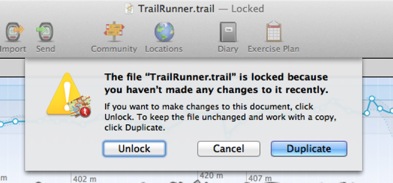
Background: This is a new system wide behavior in Mac OS X 10.7 Lion to prevent users from accidentally overwriting a documents content if not used for a longer time. In TrailRunner however it does not (always) make sense, because you generally work with only one document, which is TrailRunner.trail, stored in your Application Support folder. But the new versioning mechanism itself does makes sense, as it is a fast backup restoration method while working in your network of tracks and accidentally breaking up things.
Solution: Whenever this dialog comes up, klick on the Unlock button, because that is what you would expect.
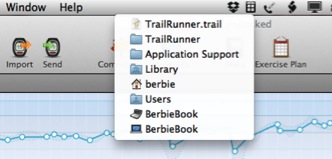
Sidenote: Interestingly even Apple itself has some problems with the new system feature.
How can I contact you?
19/01/11 19:40
Problem: you have a question you cannot solve on your own my reading this FAQ. How can I contact you?
Solution: Within the application, use the Feedback menu item to open a mail message addressed to me.
Hint: I also monitor the support forum: Ask a question, Share an idea, Report a problem, Give praise
Solution: Within the application, use the Feedback menu item to open a mail message addressed to me.
Hint: I also monitor the support forum: Ask a question, Share an idea, Report a problem, Give praise
What's the difference between activities, workouts, routes, tracks and way-points?
22/12/10 09:37
Problem: You have used other applications that import tracks and these never use vocabulary like activity, route or workout. Why is TrailRunner not using the same terms? And by the way, what is the difference between a track, an activity, a route and a workout?
Background: TrailRunner is more or less two applications in one: on the one hand a route planning application managing a personal network of tracks and on the other hand a journal for your sport activities. For your better understanding, please take a look at the TrailRunner QuickGuide. The differences should be obvious after you have read it. If not, please be so kind to let me know what you do not understand so I can improve either the QuickGuide or even TrailRunner.
> QuickGuide Tutorial
Background: TrailRunner is more or less two applications in one: on the one hand a route planning application managing a personal network of tracks and on the other hand a journal for your sport activities. For your better understanding, please take a look at the TrailRunner QuickGuide. The differences should be obvious after you have read it. If not, please be so kind to let me know what you do not understand so I can improve either the QuickGuide or even TrailRunner.
> QuickGuide Tutorial
TrailRunner is cutting of graph edges
07/04/10 14:17
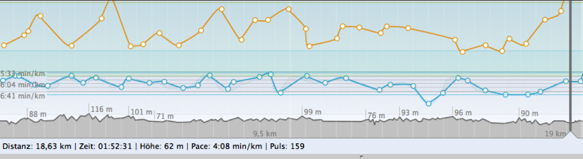
Problem: As depicted in the screenshot above, TrailRunner sometimes cuts off high values within a chart.
Background: To analyze a workout, the most interesting part of the chart is the area your workout did spend the most time in. If your GPS signal was weak and produced a noise peak, this single error would decrease the vertical resolution of your graph and therefore would make it unreadable. For this reason TrailRunner cuts off the chart for everything that is located outside of approximately 90% of your data points.
Customizing: To customize this behavior, you can control the display range under TrailRunner > Preferences > Advanced > Chart : Vertical exaggeration.
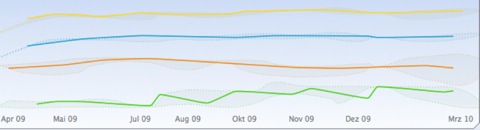
Problem: As depicted in the second screenshot above, the head or tail of a chart may not be displayed.
Background: The chart above displays a statistical trend. This means that TrailRunner takes all data points available, creates a set of intervals (in this case one month per each interval) and then displays a representative data point for this interval. The representative is the value that had the highest statistical appearance within the interval (mathematically this is called a median, not average). Then a data point is being displayed at the location of the representative. As this is almost never at the beginning or the end of the interval the graph seems to be cut off.
Sidenote: Please also note the gray border around the graph lines. The border depicts the maximum and the minimum values within each interval. So the graph gives you a good overall picture on the trend including extreme values. All data points are located within the gray area and the most frequent values are depicted by the colored line.
Activity workout splits and caclulated aggregates
19/03/10 12:21
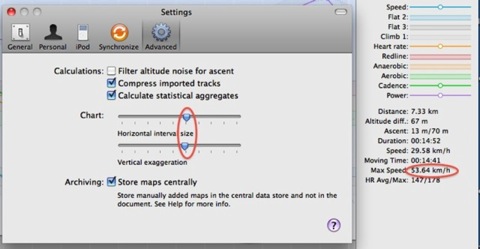
Problem: When you drag the slider in the horizontal interval settings, the value for maximum speed changes. Why is that so?
Explanation: TrailRunner can display the maximum speed value from either the imported workout data (if available) or can calculate the value by an analysis of your workout data.
On statistical aggregates
If your GPS Device has lost its signal and re-catches it, the recoded course may contain errors. This error may lead to unrealistic values as such signal jumps may assume you where moving faster that light. Therefore TrailRunner uses a low-pass filter of roughly 90% and takes the highest value within the result as your maximum speed. To turn this off, uncheck the calculate statistical aggregates option.
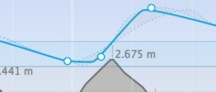
On split intervals
The horizontal interval size slider controls the size of interval splits.
The intervals are being displayed as white lines in the graph, each containing a white circle on the value that was most common within this interval.
In addition the lowest values and the highest values within this interval are being displayed as a dot bordered gray region.
The overall maximum speed of an activity is the maximum speed from all these split intervals.
As this is a statistical calculation, the values may vary when you change the size of the split intervals. The bigger the intervals, any filtering becomes stronger.
Explanation: TrailRunner can display the maximum speed value from either the imported workout data (if available) or can calculate the value by an analysis of your workout data.
On statistical aggregates
If your GPS Device has lost its signal and re-catches it, the recoded course may contain errors. This error may lead to unrealistic values as such signal jumps may assume you where moving faster that light. Therefore TrailRunner uses a low-pass filter of roughly 90% and takes the highest value within the result as your maximum speed. To turn this off, uncheck the calculate statistical aggregates option.
On split intervals
The horizontal interval size slider controls the size of interval splits.
The intervals are being displayed as white lines in the graph, each containing a white circle on the value that was most common within this interval.
In addition the lowest values and the highest values within this interval are being displayed as a dot bordered gray region.
The overall maximum speed of an activity is the maximum speed from all these split intervals.
As this is a statistical calculation, the values may vary when you change the size of the split intervals. The bigger the intervals, any filtering becomes stronger.
Existe-t-il un tutoriel en français?
01/03/09 18:49
Non, mais essayez la traduction automatique:
QuickGuide Introduction courte.
Utilisez TrailRunner avec Nike+iPod.
Utilisez TrailRunner avec ForeRunner.
> TrailRunner Help Book
> Tutoriel en anglais
Mise à jour: Jean-Daniel a écrit un cours d'instruction au sujet d'utiliser TrailRunner avec un ForeRunner:
> Garmin : les suites d'une intégration Mac OS
QuickGuide Introduction courte.
Utilisez TrailRunner avec Nike+iPod.
Utilisez TrailRunner avec ForeRunner.
> TrailRunner Help Book
> Tutoriel en anglais
Mise à jour: Jean-Daniel a écrit un cours d'instruction au sujet d'utiliser TrailRunner avec un ForeRunner:
> Garmin : les suites d'une intégration Mac OS